
Delete your iamitsekiri account.
We're sorry to see you leave the village. You can request deletion of your account and all your data here. We honour every request within 30 days.
What gets deleted
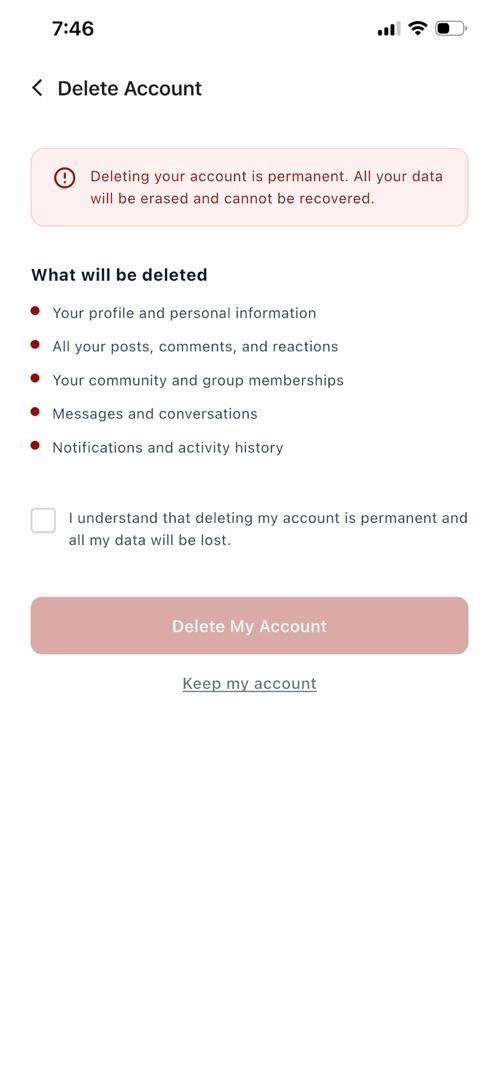
- Your profile, photos, bio, and identity verification.
- Your posts, replies, reactions, and direct messages.
- Your community and group memberships.
- Citizen reports you filed (anonymised reports remain in aggregate kingdom data).
- Marketplace listings and Youth Board contributions you created.
Some records (transactions, fraud-prevention logs) are kept for legal and regulatory reasons, in line with our privacy policy.
Delete from inside the app
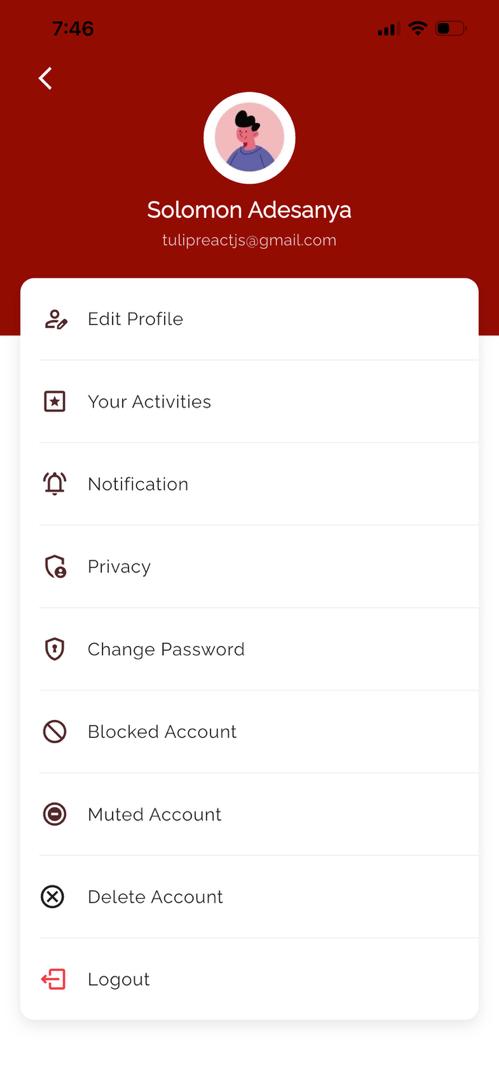
The fastest way to delete your account is right inside the iamitsekiri app on your phone. Here's how:
- 1Open the app and tap your profile picture to open the side menu.
- 2Scroll to the bottom and tap "Delete Account".
- 3Read the warning, tick "I understand", then tap "Delete My Account".
- 4You'll receive a confirmation email once your account is removed.
Can't sign in, or don't have the app installed anymore? Use the form below and we'll delete your account for you.
Prefer email?
Write to support@iamitsekiri.com from your account's email address. We'll take it from there.